(Picture Says: "Click me for a giant-sized view")
[Update: January 2002: Since this article hit Slashdot, I've received a number of emails from some helpful people. I had the opportunity to chat with a member of the Rio development team that worked on the original product. It appears that SonicBlue is working hard to add new features to the client software and firmware. Two months after purchasing the Rio, I still love it and my friends are still jealous.]
What is it?
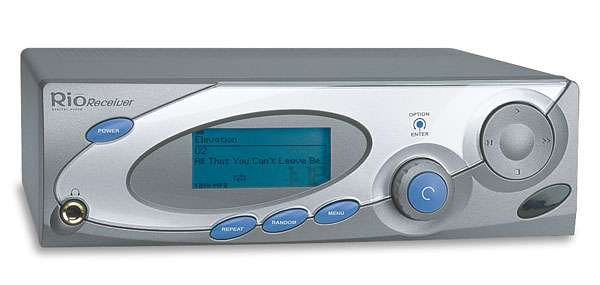
The RIO receiver is a small devices that allows you to play your digital MP3 and WMA music through any stereo system. It attaches to an Ethernet network or a HPNA (phone line) network, allowing it to access digital music files stored on a Windows PC. It's manufactured and sold by SonicBlue [http://www.sonicblue.com], the people who bought the Rio [http://www.riohome.com] line of digital music equipment from Diamond. The same device is re-branded and sold by Dell [http://www.dell.com] as the Dell Digital Audio Receiver The street price for the unit is about US$200. You can find out more about it at its website [http://www.riohome.com/products/receiver.htm]. Here's a picture for your viewing enjoyment:
(Picture Says: "Click me for a giant-sized view")
What are the tech specs?
Without going into the nitty gritty details, here's some tech specs on the unit:
Why buy it?
The advantage of purchasing the unit is that it gives you access to your digital audio collection through any stereo in your house that's close enough to a phone line or ethernet port on your home network.
Why I bought it.
Let me set the stage by saying that I have over 500 CDs and that I am addicted to music. One day, I realized something important: my music collection was taking over my life. It was getting too large to handle and my fickle nature makes me want to listen to many different types of music in a relatively short period of time. CDs tend to get stale very quickly when they are in my CD player. After having, what alcoholics sometimes refer to as, "a moment of clarity", I realized that it was time to get my act together. I discovered that my car contained 70 CDs - it was a $30,000 CD holder that happened to also be able to get me back and forth to work. There were about 100 CDs laying around in my home office and about 30 in my office at work. There were numerous CDs stuck in changers and players and CD holder and travel pouches and attache bags and just about everywhere I could put them. I was out of control. My girlfriend was about to stage an intervention when I told her that I was going to buy a third CaseLogic car visor CD holder - which I somehow thought I could rig into place, despite the fact that my car, like most others, only has two sun visors. It was bad, and I needed help. One day, I had a vision - If I made my music collection digital, I could access it from anywhere - my stereo, my car (through a car MP3 player), on the road (through a portable MP3 player), at the office, etc. I really hated my trusty Sony CD 200-disc changer, which I know has swallowed a number of CDs that I've been looking for the last 5 years. I had a dream about being able to "dial up" my music - without having to know which slot it lived in or figuring whether it was even in my house at all. I thought the Rio Receiver could help me fill these dreams. (I know, It's sad. One day I'll seek professional help.)
Where to buy it.
When I was first searching for it (November 2001), the unit was somewhat difficult to find. There were only about five online retailers carrying it, and most were out of stock. I settled on the dependable, but expensive, Crutchfield [http://www.crutchfied.com], where I purchased it for $179. Note that I have seen street prices as low as $156. Check out CNET's price comparison service [http://shopper.cnet.com/] to try to hunt one down.
What do you get with it?
The box it's packaged in is roughly the size of a toaster over. Open it up and you'll find:
Setting it Up
Assuming that you already have an Ethernet network in place, all you need to do is the following:
2. Plug the unit in. Hook up the RCA jacks to your stereo. Plug Ethernet cable in the back. Turn the unit on.
3. Select your artist/album/playlist from the LCD screen and start playing music.
What does the Windows Software Do?
Yes, you must - I repeat - you MUST use the Windows software for this thing to work (see notes on the Linux hack below, however). The software is not exactly what I would call "feature filled". The software has two purposes in life:
Those who own other Rio products may be use to getting some type of CD ripping or digital file management software with players. This, however, doesn't include anything like that.
The Windows software, dubbed the "Audio Receiver Manager", doesn't actually allow you to manage anything. It does manage to discretely sit in your system tray and is loaded when you startup and log into windows. Since I always keep my main computer on and logged in, it's not a big deal to me, however, the audio manager will not start until you log into windows (i.e. enter your username password, if you get prompted for one). I'd like to see this made into a Windows NT/2000 service for the next release. [Update: November 25, 2001: Scott Alfter wrote me to tell me about FireDaemon [http://www.firedaemon.com], which essentially turns any Windows program into a WinNT/2000 service. I downloaded it and got it running in under a minute. It works great with the Rio Audio Receiver Manager and solves the problem I described above.]
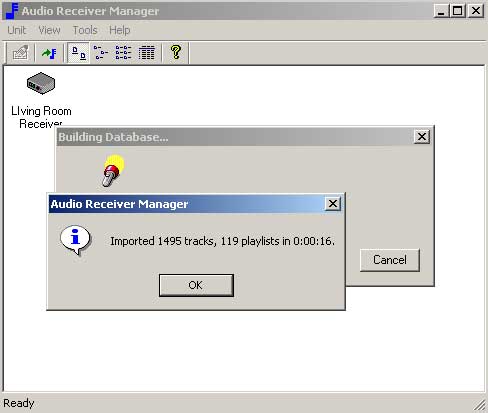
Basically, you tell the software where on your system to look for MP3/WMA/M3U files. You have the ability to specify entire drives, which can be very slow, or individual folders. You must update the database every time you want to make new music available to your receiver. During the import process, the Audio Manager must stop playing music - apparently it has difficulty walking and chewing gum at the same time.
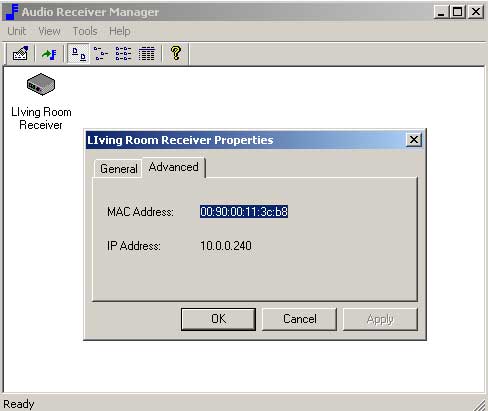
Here's some screenshots of the Windows program:
Things that particularly suck about the Windows-based Audio Receiver Manager software:
Playing your Music From the Receiver
When it comes down to doing what it is meant to do, the Rio Receiver does a very good job. It's very easy to navigate through your music collection, even if you have a large number of tracks, artists and albums. I have close to 150 albums worth of digital music and I can easily find what I'm looking for in a few seconds.
Music selection is done using a simple jog-dial knob on the front of the unit. You have the ability to search for music by artist, album, song title, genre or m3U playlist. All this information is determined by the ID3 tags [http://www.id3.org] contained within your MP3 files - therefore, it's VERY important that all of your MP3 files are embedded with at least the artist, album and song title. (See my "Tips and Tricks" below for details on this). The Rio DOES NOT CARE about the organization of your directory structure - all it wants to know is the contents of your ID3 tags.
Overall Quality and Performance
Overall, the sound quality is very good. Of course, sound quality greatly depends on the bitrate used to encode your digital music files. I encode all my MP3s at 192 bits using LAME [http://www.mp3dev.org/mp3/] - the quality is excellent. The Receiver just takes a digital stream of the music files over the network and decodes it, so there is no loss in quality due to the network transfer or any weird types of streaming protocols. At 192bits, no one can tell that the music is sourced from am MP3 file.
The unit has a 10-second buffer, just in case there are any network slowdowns. I wanted to figure out just what it would take to make the thing stop or skip or do whatever it may do if the network gets really busy. So I wrote a simple Perl script to transfer a 200MB file between my Windows box and my Linux box over HTTP using 15 simultaneous threads (i.e. 15 downloads occuring at the same time). This is, of course, way more than what I normally see on my home LAN, which is usually just comprised of me and my girlfriend surfing the web (mostly me, of course). I should note that my home network uses a NetGear 10/100 Hub (not a switch) and a Linksys 10MB in the Living room - so the effective throughput will never exceed 10MB (not including protocol overhead). With 2 Skinny J's The Whammy playing in the background, I started the network torture test. Despite the fact that my Linux box's four-year-old hard drive protested, the Rio Receiver didn't skip a beat (no pun intended). So I think you can be pretty sure that this thing will work well, even in a busier network environment.
Did you say it runs Linux?
Yes, it runs Linux. Many people tend to get very aroused about this these days. I am a Linux advocate, as I like to advocate any technology that helps you work or play better, but I'm not a Linux zealot. But for the more curious, the unit has already been hacked, although it appears to be a bit more difficult to do than it should be. Jeff Mock has put together a wonderful collection of information [http://www.mock.com/receiver/] related to hacking the Receiver. Even though I was greatly tempted see what you can do with the thing, I figure I bought it to do what it does best - play music. I'm happy with its feature set and don't feel the need to crack it open. If this unit gets more popular and there are a number of good hacks available out there, you may see more people trying ot hack it.
What Operating Systems Does it Work With? (Do I have to use Windows?)
The Rio Audio Receiver Manager software officially supports Windows98, 98SE, 2000 and ME. Although not listed, I'm sure it also works on XP, as the application nothing more than simple HTTP and UDP server. [Update (November 25, 2001): My friend, Roy Tucker, confirms that the Audio Receiver Manager software runs on XP. So blame him when it blows up your PC.] It will not run on Windows95 or WindowsNT 4.0.
There are a few efforts underway to make the unit work with non-Windows servers. The first is a home-grown project put together by Jeff Mock [http://www.mock.com/receiver]. Jeff has done an excellent job at reverse engineering the Rio's protocols and has put together a number of scripts that allow you to use a Linux machine as the file server. At this time, his software does not support playlists, but after looking at the code and the protocols, it is probably an easy thing to add. Be aware, though, installation of Jeff's code is not a trivial task - you need to have knowledge about Linux, Apache and Perl and there's not a lot of "HOW-TO" documentation available (who has time to document, anyway?...especially for open-source projects that don't pay the bills?). It took me about 40 minutes, but I got Jeff's scripts running. Again, he did a great job with this.
Second, there's an open source project called Digital Audio Server [http://sourceforge.net/projects/das/], which I have not tried out. It looks as if it might be a bit more complete and simpler to use than Jeff's solution.
There's a third project called Jreceiver [http://sourceforge.net/projects/jreceiver/], which is open source servlet-based audio server built to support network-based MP3 players like the Rio. However, it appears to be quite immature at this time. It's completely servlet-based, but does not support Tomcat, which is a major drawback, in my opinion.
Are there competitors?
Yes, in fact there is one generally-available competitor that I am aware of: The Turtle Beach Audiotron [http://www.audiotron.net/audiotron.asp]. I like this particular product a lot. Had it not been for the Rio's attractive $150 street price, I probably would have bought the Audiotron. There are a few major differences in the way that these boxes operates. First, the Audiotron is a full-size (but thin) stereo rack component, so it can blend nicely into your existing system. Second, the Audiotron accesses music over a simple SMB share, so you can simply export a folder from your Windows or UNIX box and make it available to the Audiotron. There's no server-side software required. Third, you can actually READ the LCD display on the Audiotron from a distance greater than 10 inches. Forth, the Audiotron has a TOSLINK optical output, which is nice to have. Last, but not least, the Audiotron comes with a suite of useful software, including a web-based front-end. The street price for the Audiotron, however, is about double the price of the Rio. You can read Rob Malda's review of the Audiotron on Slashdot [http://slashdot.org/article.pl?sid=01/10/12/1423233].
Tips, Tricks and Things to Be Aware Of
+/MP3-Root-Directory
	+/Artist-Name
		+/Album-Name
			/Track.mp3
			/Track.mp3
			/Track.mp3
			etc.
I think this is the typical way most people organize their MP3's, so the Perl script may be helpful. Also, since I think Playlists are so important, I wrote a Perl script that hunts out any album directories that DO NOT contain playlists and prints them out for you. (BTW, if you didn't know this already, you need to install Perl [http://www.cpan.org] on your machine for these to work).
For the tech weenies:
So I set out to determine the protocols used between the Receiver and the Windows server. I figured that if I could reverse engineer these protocols, I could write my own server software to circumvent the lack of features in Rio version - including getting the server to run on Linux. So I started running Etherpeek sniffs of my network and began analyzing the traffic flow between the Receiver and my PC. I was about a half hour into it when I first discovered Jeff Mock's great "Hacking the Rio Receiver" page [http://www.mock.com/receiver]. Jeff did a far better job that I did in my first 30 minutes, so I used his notes to compare what I sniffed (btw, Jeff, your 100% right on...awesome work). The result of Jeff's sniffing efforts produced a set of scripts that allow you to run a Linux version of the server software (available for download on his site).
Basically, the protocol is simple, but there's a lot of little steps to actually get to the point where the music starts playing. Here's a quick overview:
Lots more that can be done with this...if you have the time and can think up a good use for it.
As a side not, if you're looking for a front-end to your MP3 collection and you're using Apache, take a look at Lincoln Steins's Apache::MP3 [http://www.modperl.com/Songs/], for use with mod_perl. I use it and love it. It gets me access to my entire music collection anywhere that I have an Internet connection.